| | Spreadsheets : Replication | 
|
|
Often you will want to use several similar formulae in a spreadsheet. In the spreadsheet below a formula which is nearly the same is used to calculate each student’s total mark. The formula is changed slightly for each pupil because their marks are on different rows.

To avoid the need to type a similar formula in the three formulas in rows 3 to 5 can be generated automatically using the formula in row 2. To do this you must :
Copying a formula like this is known as replication. If you want to copy a formula along a row rather than down a column you can use the fill right option instead. Because the formula changes as you copy it is known as a relative formula, or relative reference.
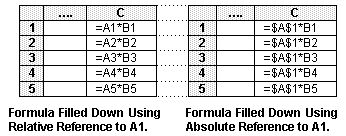
Sometimes you may not want a reference to a cell to change when a cell is copied in this way. To prevent a cell reference in a formula changing when you copy it you should precede the letters and numbers in the reference by a $ sign. Look at this formula :
=D3* $A$1
If you chose the fill down option with this formula the next row will contain the formula =D4*$A$1, the one after the formula =D5*$A$1 and so on. The first cell reference D3 changes but the second, A1, does not. Because the A1 reference does not change it is known as an absolute reference.
As well as fill down and fill right, the usual cut, copy and paste operations can be used to copy (or replicate) formulas.
GCSE ICT Companion 04 - (C) P Meakin 2004